
Choose the content before choosing the output
A revision sheet might need the worked example on page A3 and the exercise on page B2. Keeping both full pages adds introductions, headers and blank space. Cropping lets you collect the relevant areas in the order you intend to study them.
The current workspace keeps one rectangular region per source page. It does not detect questions automatically or collect multiple separate boxes from the same page in one selection. If you need several disconnected questions on a page, keep a larger region that includes them.
Crop an example and an exercise, step by step
Use Lecture A page 3 for the worked example and Lecture B page 2 for the exercise. These original demonstration documents contain no personal data and can be reused to try the workflow.
- Add both PDFs and select page 3 from A and page 2 from B. Verify the source name on each thumbnail.
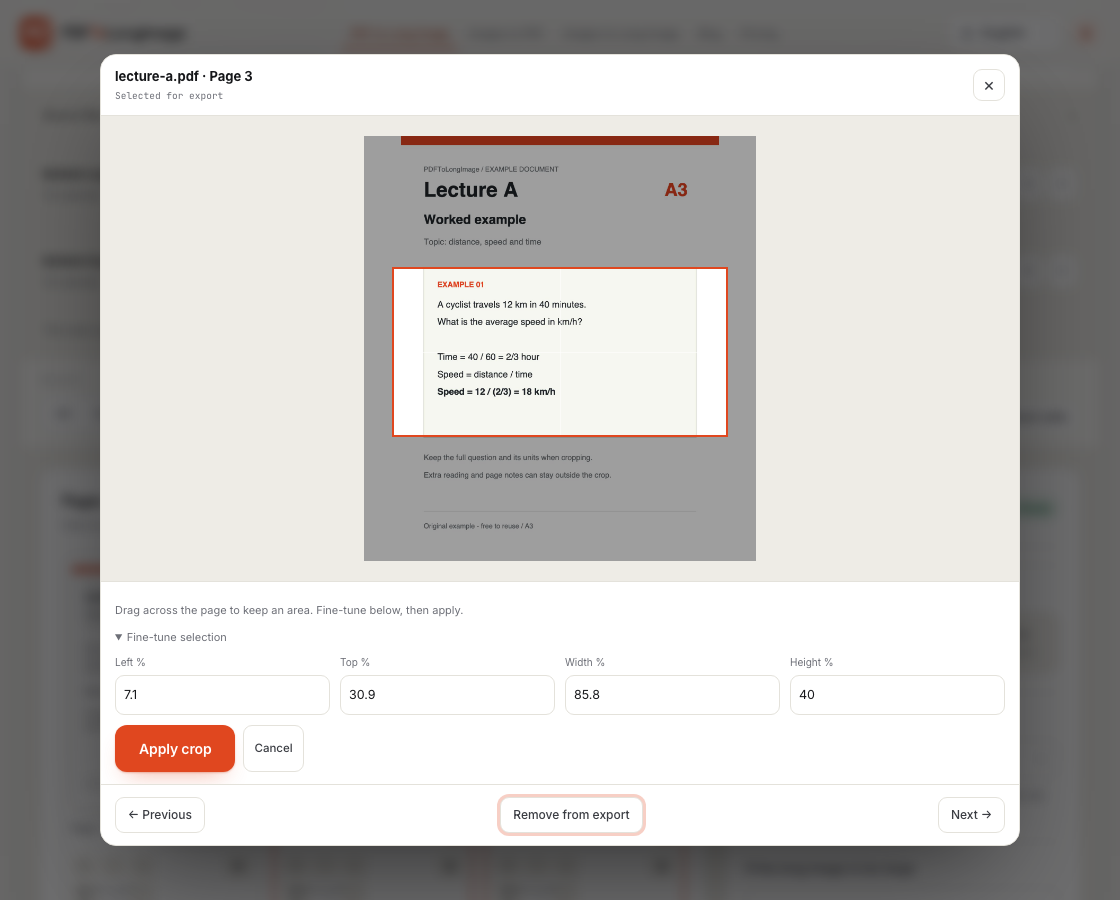
- Open Crop area on A3. Drag a rectangle around the complete example, including its labels and any needed context.
- Adjust the left, top, width and height percentages if you need a more precise boundary, then choose Apply crop.
- Repeat for B2. Arrange the selected regions, and rotate a page if its reading direction needs correcting.
- Export a PNG long image for continuous reading, or choose New PDF for one region per page. Both use the same crop edits and require Pro.
Why crop the source PDF instead of a screenshot?
A screenshot contains only the pixels captured from your screen. Enlarging it cannot recover the original letter shapes. A region selected on a PDF can be rendered from the document at the chosen output resolution, so vector text and diagrams are not limited to the thumbnail’s pixel dimensions.
This does not create detail absent from the source. A scanned page is already an image, and a blurry scan stays limited by its original resolution. Check small text, subscripts and diagram labels at a readable zoom after export.
Margin trimming and region cropping solve different problems
Automatic white-margin trimming removes surrounding blank space. It is useful for a whole document page and is part of the free basic conversion workflow. It does not know which exercise or chart you want.
Manual region cropping lets you choose the content to keep, even when other text surrounds it. This is a Pro editing feature. Use Restore full page to remove a crop, and Cancel to leave the previous selection unchanged.
A cropped PDF is not a redacted PDF
For original PDF pages copied directly into a new PDF, cropping changes the visible page area. Content outside that area can remain in the PDF file. Do not rely on this workflow to permanently remove confidential or personal information.
Use a dedicated redaction tool when permanent removal is required. Adobe’s explanation of PDF cropping describes the same distinction between hiding content and discarding it.
Keep a revisable version of your notes
Save a named project with Pro to reopen the original files, page selection, order, rotations and crops later. This is local browser storage, not account cloud storage. It is available only in the browser that saved it, and clearing site data deletes it.
A long image is useful for continuous reading; a new PDF gives each chosen region its own page. Exporting either format does not add OCR, automatic topic grouping or multiple-region selection.
Questions and answers
Can I crop more than one question from a single page?
The workspace currently stores one rectangular region for each source page. Include the questions in one larger rectangle if they need to stay together; separate boxes from the same page are not supported in one selection.
Is cropping the same as removing white margins?
No. White-margin trimming removes surrounding blank space. Manual region cropping keeps a specific area you choose and can exclude other visible content.
Will cropping permanently delete content outside the selection?
Do not assume so. In a PDF export that preserves the original page, cropping changes the visible area and other content may remain in the file. Use a redaction tool for permanent removal.